
 Juan Díaz
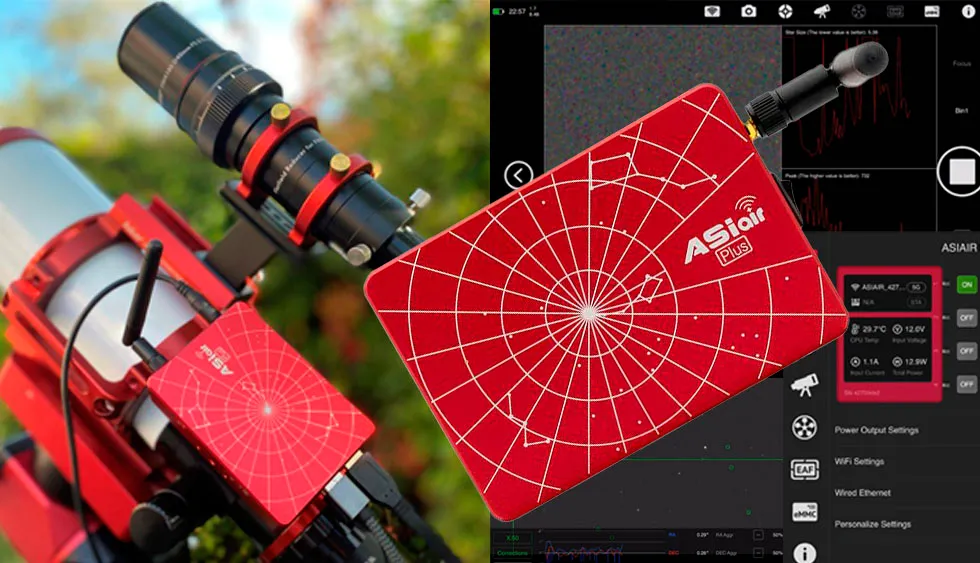
ASIAir Plus, an Observatory in the palm of your hand
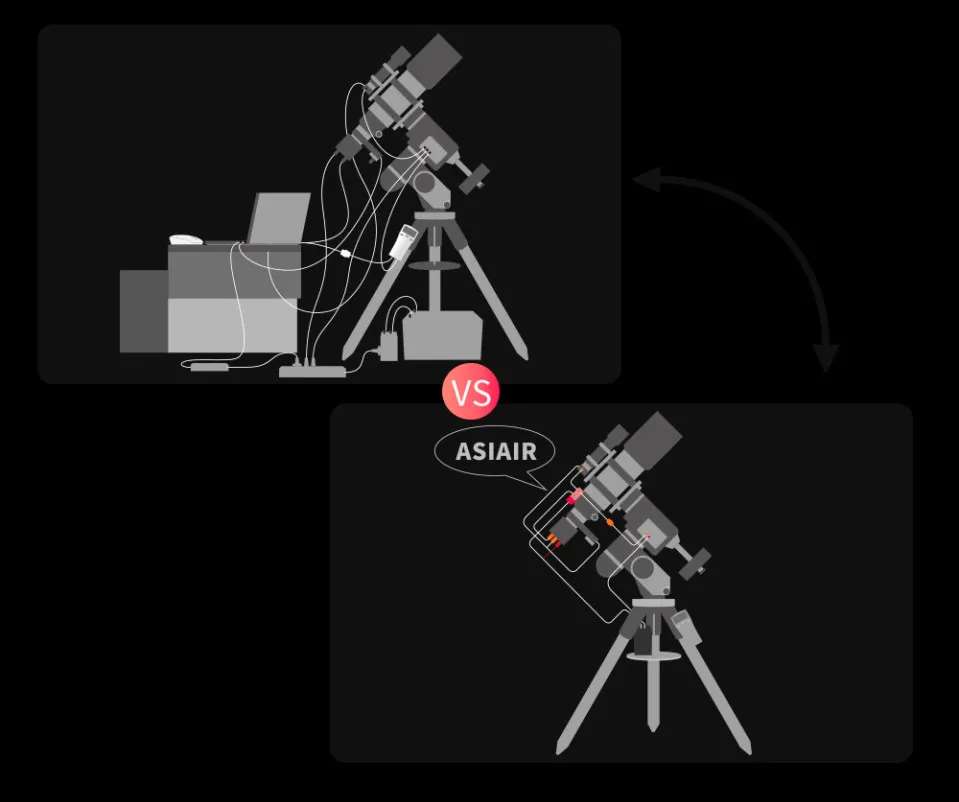
Astrophotographers picture our equipment as a mount, an optical tube, a guiding system, a camera and so on, all of it connected through a tangle of cables that link the devices to each other, plus the cables that power them and connect them to our computer.
In short, our setup with connection and power cables would be this:
- Main camera to PC (or to a hub)
- Guide camera to PC (or to a hub)
- ST4 cable from the guide camera to the mount
- Mount power
- Heater strap cables to another power source (usually 5 V)
- Main camera power
- Filter wheel and its cable
- Focuser cable to the PC (or to a hub)
- Focuser power
- Mount hand-controller cable
- Pole Master cable (if we use it for polar alignment)
- Laptop with its power cable
If all our devices are from ZWO, the tangle is considerably simplified, since the cooled cameras include a hub with two USB 2.0 ports, allowing us to connect the EAF focuser and the guide camera to our EFW filter wheel.
Now comes the interesting part: the purpose of the ASIAir Plus.
The ASIAir Plus will simplify all this mess. Astrophotographers have always wanted as few cables as possible to «come down» from the equipment, and the rest to be tidy. That is how ASIAir was born: a device that «brings all the others together».
Built on a Raspberry platform, the product has improved over time and solved the problems typical of a new product, up to its 3rd generation. This one includes important improvements; one of the most notable (and visible thanks to its antenna) is the improved wifi communication, and faster data handling and storage thanks to 32 GB of internal memory.
This device is a manager for all the accessories needed to succeed as an astrophotographer. If our accessories are from ZWO itself, we can unify the connection of all the cameras, the focuser, the filter wheel and the power for the heater straps in a single control centre that moves together with our tube, avoiding snags and tugs on the cabling. It communicates via wifi with our smartphone or tablet through the product’s own app.
At this point it should be said that handling it from a mobile phone is somewhat awkward. Ideally, a tablet should be used. This is one of the first things that sets ASIAir apart: everything is managed from a mobile device, wirelessly, and it cannot be operated from a computer.
Keeping to the spirit of unifying the whole process, ZWO has developed its own app that brings the software management together. It is no longer necessary to run several programs in parallel (guiding, capture, planisphere…). Everything is included in a single application.
What can we connect to the ASIAir?
If all our devices are ZWO, we can connect everything (something the manufacturer has surely done on purpose, and which encourages brand loyalty). In addition, ASIAir Plus accepts a large number of Canon and Nikon cameras; if that is our case, we will have no problem.
- Almost all mounts on the market
- Main camera (ZWO or DSLR)
- Guide camera
- Focuser
- Filter wheel
- Heater straps
Let’s look at the advantages of connecting these elements to the ASIAir Plus.
Mount
- Polar alignment management through the app.
- Planisphere control and GoTo.
- Together with the Plate Solver indexes included in the app, fast centring and framing of the photograph.
Main camera and guide camera
- Control of all the camera parameters (including sensor temperature).
- Deep-sky shot scheduler.
- Guiding management through the guide camera and the mount.
Focuser and filter wheel
- Autofocus function (no need for Bahtinov masks).
- Focus programming as the temperature changes.
- Filter and shot programming, with an autofocus option when filters are swapped.
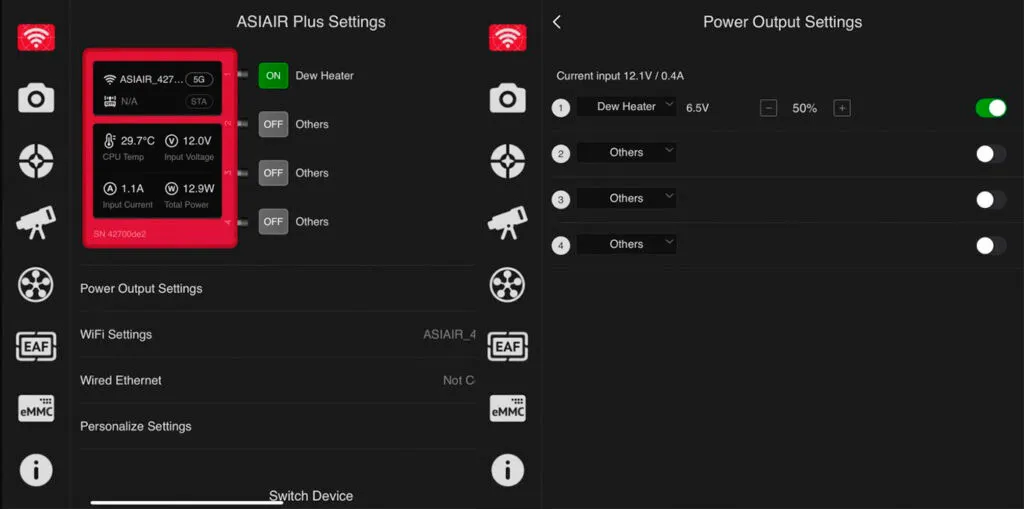
ASIAir has 4 12 V DC output ports, which will be especially useful for powering several things, and in particular a couple of very important ones: the camera cooling system and the heater straps. Even the mount can be powered from here.
Heater straps and mount power
ZWO has introduced a very significant improvement in this new version of ASIAir Plus: management of the power sent to these ports. We can now regulate how much power we send to each heater strap independently. This is especially useful, since it lets us regulate the temperature of the lens very efficiently, avoiding condensation or excess heat that would cause turbulence. We can also see at any moment the voltage and consumption of each connected accessory, which is especially useful to avoid voltage drops if we power everything from a battery.
ASIAir Plus improvements vs. ASIAir Pro
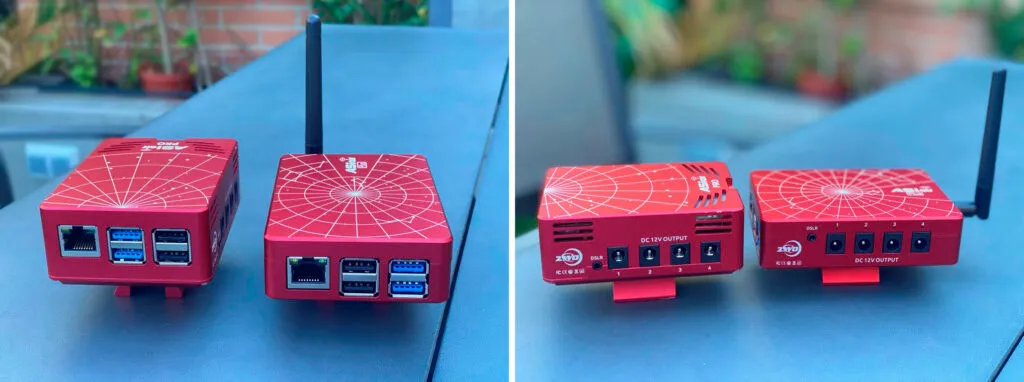
Externally, ZWO has introduced several improvements in its new device: it is now smaller and more compact, and the antenna stands out, with which they intend to solve a problem the previous version suffered from: wifi signal drops. The antenna has significantly improved the signal strength, avoiding, as far as we have been able to check, the recurring drops of the previous version. With a dual 2.4 GHz and 5 GHz band it reaches a distance of up to 20 m according to the manufacturer. We have made some measurements on this to verify the figure. A better signal quality can be seen in this new version at first glance.
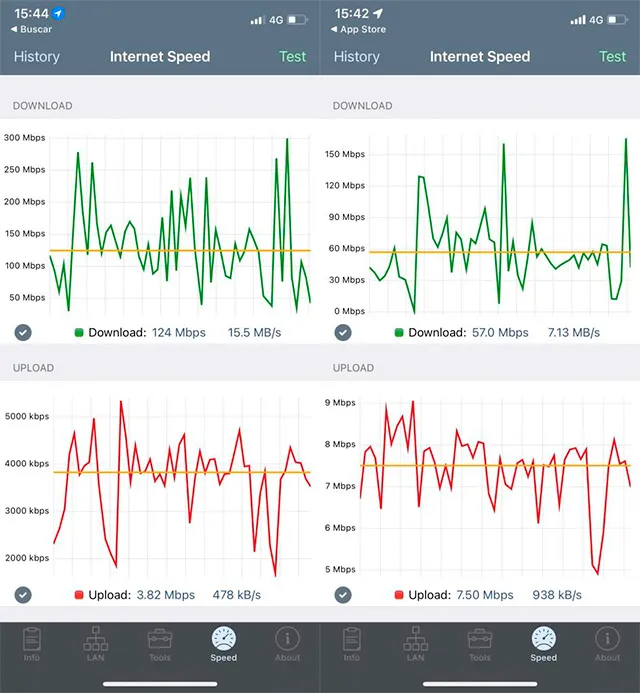
In this chart we can see that the download rate of the ASIAir Plus is significantly higher than in the previous model: 15.5 MB/s versus 7.13 MB/s.
This was to be expected given the improvement the manufacturer has made to the device’s communications. In our test with this unit we have had no disconnection problems, although this is something that would need to be measured and validated.
The new USB port allows the stored files to be transferred quickly and directly to a hard drive or a laptop. Another clear improvement is the greater processing and storage capacity.
The current trend towards large sensors with ever higher resolution multiplies the data-management needs.
The new ASIAir Plus version has replaced loading the firmware from a card with an eMMC memory of 32 GB and 20 GB of free space for photos or videos. This makes it up to 2.5 times faster than its predecessor, which allows far more stable and faster information handling than the previous version, where loading and storage were done on a card.
Get the most out of your ZWO ASIAir
As you have seen, ASIAir is the device that is revolutionising the way astrophotography is done. However, we will get the most out of its capabilities by knowing in depth how all its tools and settings work. That is why Astroacademy reminds you that our online academy offers the complete course ZWO ASIAir Plus from 0 to 100, a course that will let you get the full performance out of your astrophotography equipment.
Summary
This third generation of the ASIAir, named Plus, keeps the philosophy of the previous ones regarding centralised management of the whole setup based on ZWO’s own app. It adds some significant improvements, especially related to communications and high-speed data processing. It also remains a good-looking device, and is now smaller and lighter. Above all, it brings the overall astrophotography process closer to all users in a simple way, from the complete beginner to the most experienced.
To finish, in its favour we have: improved wifi signal strength, higher processing speed, firmware loaded from internal storage, and everything in one if the devices are ZWO.
And against: it forces you to use ZWO devices and signal drops will need to be validated.
Here are the links to the ASIAir Facebook group and the manufacturer’s website.
And of course here is the link to our Astroacademy, where you will find this ASIAir course and many more that we will upload soon.